DynamoDB with PartiQL

A Developer Advocate experiencing DevRel ecospace at Freshworks. Previous being part of the start-up Mobil80 Solutions based in Bengaluru, India enjoyed and learnt a lot with the multiple caps that I got to wear transitioning from a full-stack developer to Cloud Architect for Serverless!
An AWS Serverless Hero who loves to interact with community which has helped me learn and share my knowledge. I write about AWS Serverless and also talk about new features and announcements from AWS.
Speaker at various conferences globally, AWS Community, AWS Summit, AWS DevDay sharing about Cloud, AWS, Serverless and Freshworks Developer Platform
PartiQL was introduced to AWS DynamoDB, with AWS making the announcement in 2020 making the life of developers easier, with the comfort of executing commands similar to SQL.
What is PartiQL?
A SQL-compatible query language — in addition to already-available DynamoDB operations—to query, insert, update, and delete table data in Amazon DynamoDB. PartiQL makes it easier to interact with DynamoDB and run queries in the AWS Management Console. Because PartiQL is supported for all DynamoDB data-plane operations, it can help improve the productivity of developers by enabling them to use a familiar, structured query language to perform these operations.
Ways to access PartiQL for DynamoDB
- AWS CLI
- AWS Web console
- DynamoDB with AWS SDK
- NoSQL Workbench
For the walk-through of PartiQL, the tables would be using -
- DynamoDB single-table design of Copa America table.
- AWS CloudShell for CLI executions of statements.
- NodeJS snippets for the statement executions.
- PartiQL Editor on AWS web console.
Creating the DynamoDB table
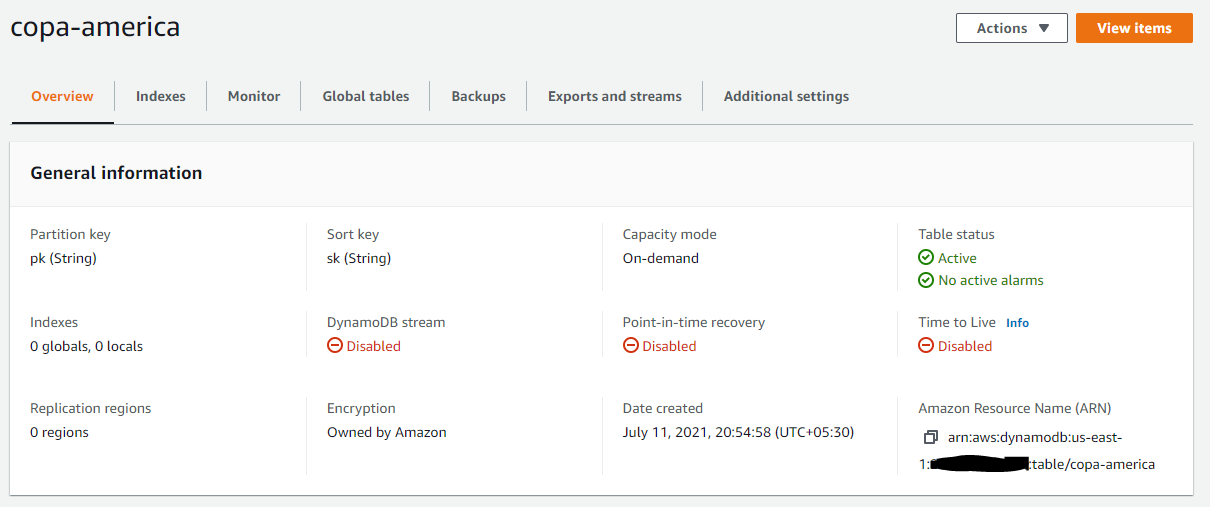
The DynamoDB table copa-america has the schema of pk as partition key and sk as sort key. Also provisioning the DynamoDB to be ON DEMAND, so setting the billing-mode PAY_PER_REQUEST.
aws dynamodb create-table --attribute-definitions \
  AttributeName=pk,AttributeType=S \
  AttributeName=sk,AttributeType=S \
 --key-schema \
  AttributeName=pk,KeyType=HASH \
  AttributeName=sk,KeyType=RANGE \
 --billing-mode PAY_PER_REQUEST\
 --table-name copa-america
You can find the created table details on the console.
Inserting team details
The simplest way to insert with PartiQL is with a INSERT statement similar to SQL statement.
INSERT INTO "copa-america" VALUE {'pk':'TEAM','sk':'Argentina#Group A#1','display_name':'Argentina','team_group':'Group A','ranking':1,'matches_played':4,'matches_won':3,'matches_drew':1,'matches_lost':0,'goals_for':7,'goals_against':2,'goals_difference':5,'team_points':10}
The same with NodeJS could be executed with executeStatement API.
const insert_teams = async(event) => {
    let team = event.team
    let teamParams = {
        pk: "TEAM",
        sk: team.name + "#" + team.group + "#" + team.ranking,
        display_name: team.name,
        team_group: team.group,
        ranking: team.ranking,
        matches_played: team.matches_played,
        matches_won: team.matches_won,
        matches_drew: team.matches_drew,
        matches_lost: team.matches_lost,
        goals_for: team.goals_for,
        goals_against: team.goals_against,
        goals_difference: team.goals_difference,
        team_points: team.team_points
    }
    let partiqlStmt = {
        Statement: `INSERT INTO "testing-partiql" VALUE "{'pk':'${teamParams.pk}','sk':'${teamParams.sk}','display_name':'${teamParams.display_name}','team_group':'${teamParams.team_group}','ranking':${teamParams.ranking},'matches_played':${teamParams.matches_played},'matches_won':${teamParams.matches_won},'matches_drew':${teamParams.matches_drew},'matches_lost':${teamParams.matches_lost},'goals_for':${teamParams.goals_for},'goals_against':${teamParams.goals_against},'goals_difference':${teamParams.goals_difference},'team_points':${teamParams.team_points}}"`,
    }
    let response = await dynamodb.executeStatement(partiqlStmt).promise()
    return response
}
With the similar features of batchWriteItem, with PartiQL you can do a batch execution of statements with batchExecuteStatement.
aws dynamodb batch-execute-statement --statements \
> '[{"Statement": "INSERT INTO \"copa-america\" VALUE \"{'pk':'TEAM','sk':'Uruguay#Group A#2','display_name':'Uruguay','team_group':'Group A','ranking':2,'matches_played':4,'matches_won':2,'matches_drew':1,'matches_lost':1,'goals_for':4,'goals_against':2,'goals_difference':2,'team_points':7}\"" },  { "Statement": "INSERT INTO \"copa-america\" VALUE \"{'pk':'TEAM','sk':'Paraguay#Group A#3','display_name':'Paraguay','team_group':'Group A','ranking':3,'matches_played':4,'matches_won':2,'matches_drew':0,'matches_lost':2,'goals_for':5,'goals_against':3,'goals_difference':2,'team_points':6}\""}, { "Statement": "INSERT INTO \"copa-america\" VALUE \"{'pk':'TEAM','sk':'Chile#Group A#4','display_name':'Chile','team_group':'Group A','ranking':4,'matches_played':4,'matches_won':1,'matches_drew':2,'matches_lost':1,'goals_for':3,'goals_against':4,'goals_difference':-1,'team_points':5}\"" }, { "Statement": "INSERT INTO \"copa-america\" VALUE \"{'pk':'TEAM','sk':'Bolivia#Group A#5','display_name':'Bolivia','team_group':'Group A','ranking':5,'matches_played':4,'matches_won':0,'matches_drew':0,'matches_lost':4,'goals_for':2,'goals_against':10,'goals_difference':-8,'team_points':0}\"" }, {"Statement": "INSERT INTO \"copa-america\" VALUE \"{'pk':'TEAM','sk':'Brazil#Group b#1','display_name':'Brazil','team_group':'Group b','ranking':1,'matches_played':4,'matches_won':3,'matches_drew':1,'matches_lost':0,'goals_for':10,'goals_against':2,'goals_difference':8,'team_points':10}\"" }, { "Statement": "INSERT INTO \"copa-america\" VALUE \"{'pk':'TEAM','sk':'Peru#Group b#2','display_name':'Peru','team_group':'Group b','ranking':2,'matches_played':4,'matches_won':2,'matches_drew':1,'matches_lost':1,'goals_for':5,'goals_against':7,'goals_difference':-2,'team_points':7}\""}, { "Statement": "INSERT INTO \"copa-america\" VALUE \"{'pk':'TEAM','sk':'Colombia#Group B#3','display_name':'Colombia','team_group':'Group B','ranking':3,'matches_played':4,'matches_won':1,'matches_drew':1,'matches_lost':2,'goals_for':3,'goals_against':4,'goals_difference':-1,'team_points':4}\""},{"Statement": "INSERT INTO \"copa-america\" VALUE \"{'pk':'TEAM','sk':'Ecuador#Group B#5','display_name':'Ecuador','team_group':'Group B','ranking':5,'matches_played':4,'matches_won':0,'matches_drew':3,'matches_lost':1,'goals_for':6,'goals_against':6,'goals_difference':-1,'team_points':3}\"" },{ "Statement": "INSERT INTO \"copa-america\" VALUE \"{'pk':'TEAM','sk':'Venezuela#Group B#5','display_name':'Venezuela','team_group':'Group B','ranking':5,'matches_played':4,'matches_won':0,'matches_drew':2,'matches_lost':2,'goals_for':2,'goals_against':6,'goals_difference':-4,'team_points':2}\""}]'
Similarly on NodeJS execution,
const insert_teams_bulk = async(event) => {
    let partiqlInsertParams = {
        Statements: []
    }
    for (let team of event.teams) {
        let teamParams = {
            pk: "TEAM",
            sk: team.name + "#" + team.group + "#" + team.ranking,
            display_name: team.name,
            team_group: team.group,
            ranking: team.ranking,
            matches_played: team.matches_played,
            matches_won: team.matches_won,
            matches_drew: team.matches_drew,
            matches_lost: team.matches_lost,
            goals_for: team.goals_for,
            goals_against: team.goals_against,
            goals_difference: team.goals_difference,
            team_points: team.team_points
        }
        let partiqlStmt = {
            Statement: `INSERT INTO "testing-partiql" VALUE "{'pk':'${teamParams.pk}','sk':'${teamParams.sk}','display_name':'${teamParams.display_name}','team_group':'${teamParams.team_group}','ranking':${teamParams.ranking},'matches_played':${teamParams.matches_played},'matches_won':${teamParams.matches_won},'matches_drew':${teamParams.matches_drew},'matches_lost':${teamParams.matches_lost},'goals_for':${teamParams.goals_for},'goals_against':${teamParams.goals_against},'goals_difference':${teamParams.goals_difference},'team_points':${teamParams.team_points}}"`,
        }
        partiqlInsertParams.Statements.push(partiqlStmt)
    }
    let response = await dynamodb.batchExecuteStatement(partiqlInsertParams).promise()
    return response
}
Retrieving the items
Retrieving is performed with SELECT statement with PartiQL.
Scan operation
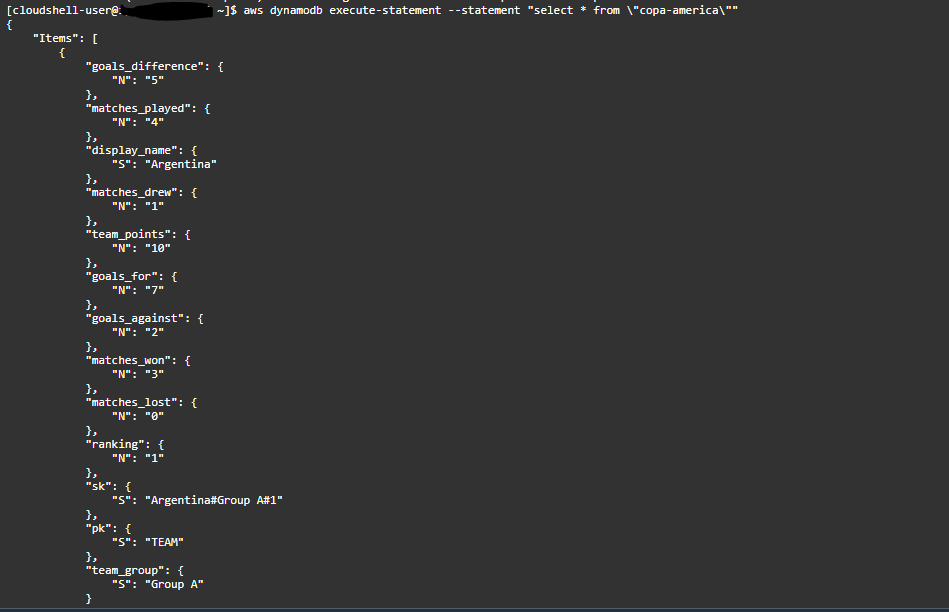
aws dynamodb execute-statement --statement "select * from \"copa-america\""
Result
Web console PartiQL editor available on the new DynamoDB console.
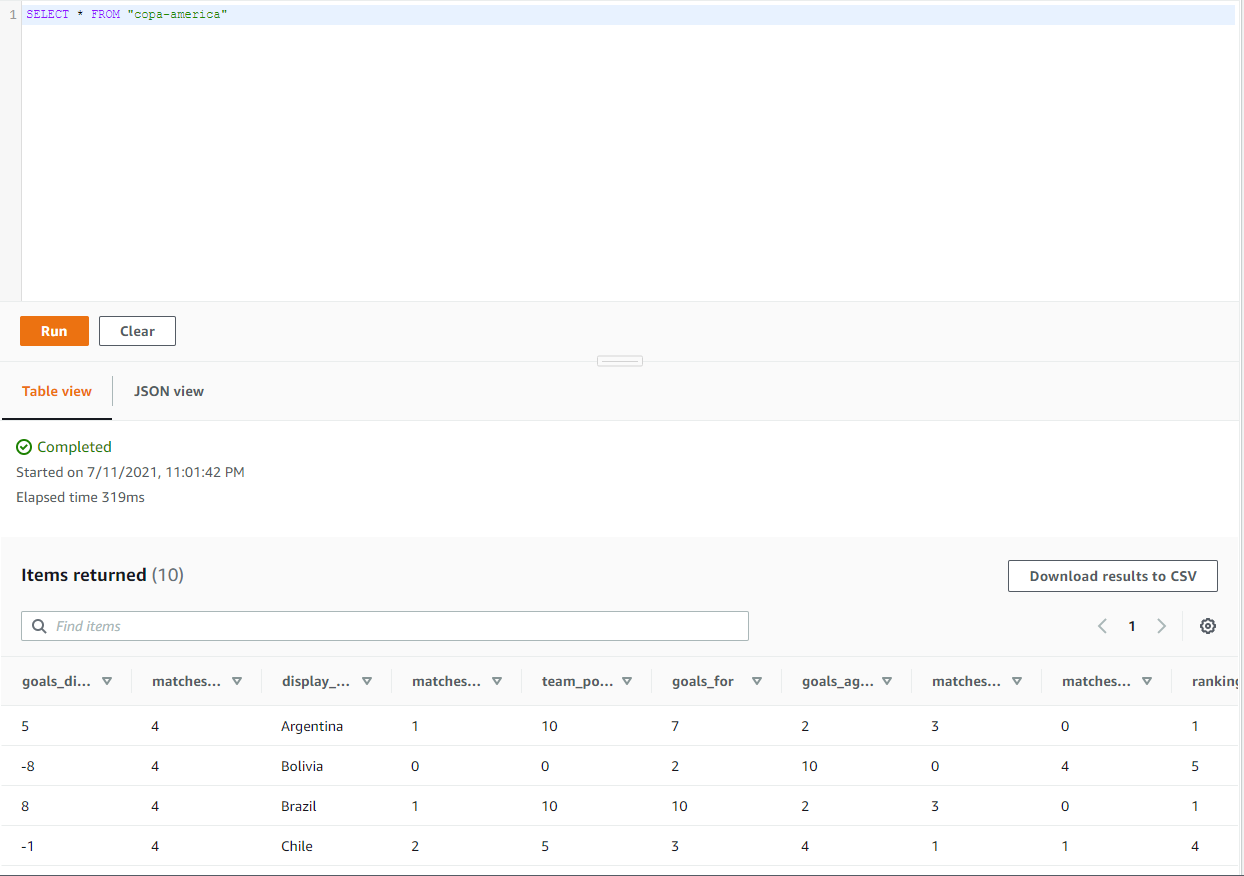
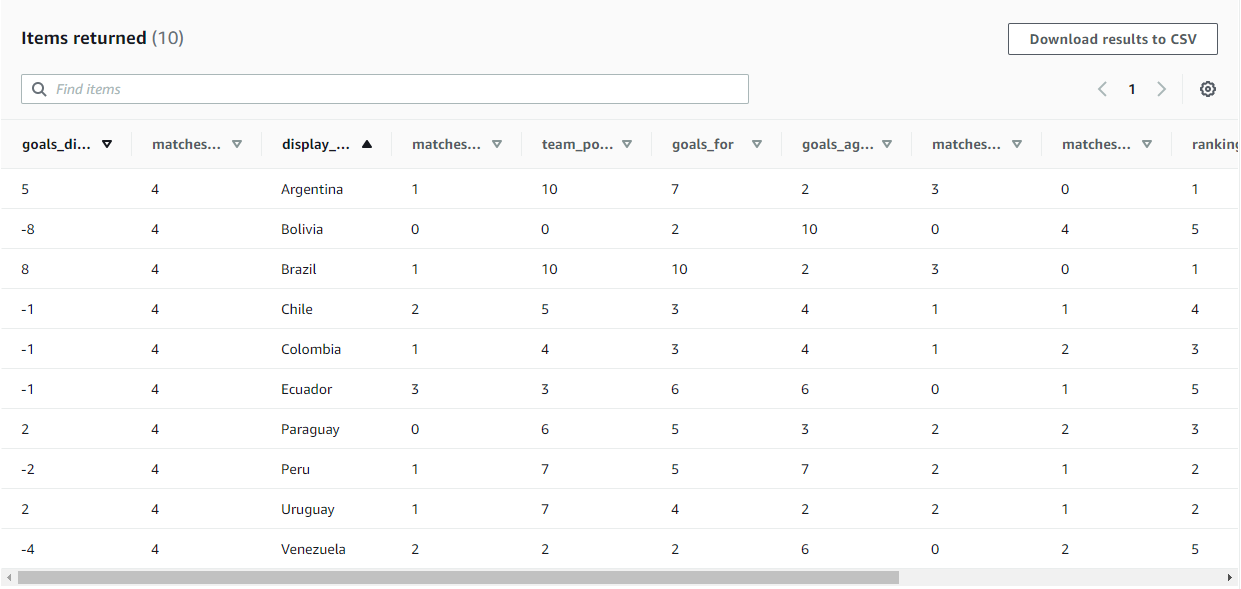
Scanning to get all the teams of Copa America
SELECT * FROM "copa-america" WHERE "pk" = 'TEAM'
For DynamoDB projection expression support with PartiQL is done with how SQL statements are supported by specifying the attributes in SELECT.
aws dynamodb execute-statement --statement "SELECT display_name FROM \"copa-america\" WHERE \"pk\" = 'TEAM'"
{
    "Items": [
        {
            "display_name": {
                "S": "Argentina"
            }
        },
        {
            "display_name": {
                "S": "Bolivia"
            }
        },
        {
            "display_name": {
                "S": "Brazil"
            }
        },
        {
            "display_name": {
                "S": "Chile"
            }
        },
        {
            "display_name": {
                "S": "Colombia"
            }
        },
        {
            "display_name": {
                "S": "Ecuador"
            }
        },
        {
            "display_name": {
                "S": "Paraguay"
            }
        },
        {
            "display_name": {
                "S": "Peru"
            }
        },
        {
            "display_name": {
                "S": "Uruguay"
            }
        },
        {
            "display_name": {
                "S": "Venezuela"
            }
        }
    ]
}
The above PartiQL statement uses pk in the WHERE cause as it is a SCAN operation which is performed but internally uses the defined sk to sort the response items.
Querying with PartiQL
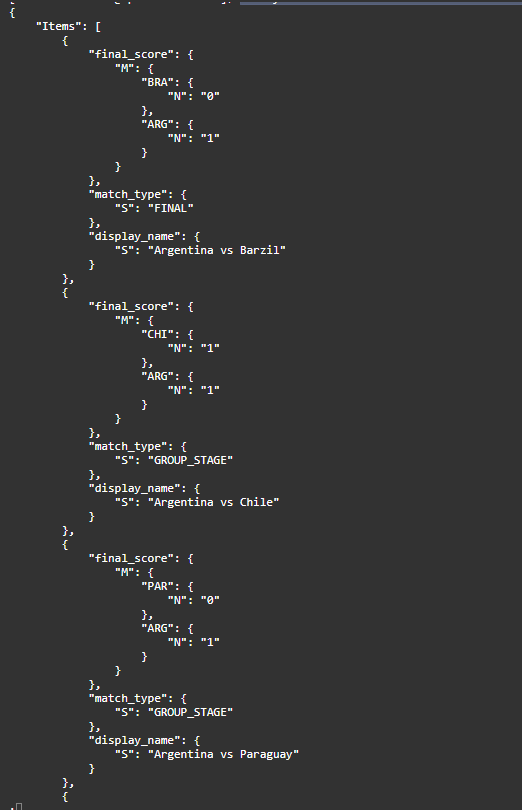
Queries on DynamoDB works the same way with PartiQL you can leverage the key schema of partition and sort keys to query on your DynamoDB table.
SELECT * FROM "copa-america" WHERE "pk" = 'MATCH' and contains("sk",'ARG')
aws dynamodb execute-statement --statement "SELECT display_name,match_type,final_score FROM \"copa-america\" WHERE \"pk\" = 'MATCH' and contains(\"sk\",'ARG')"
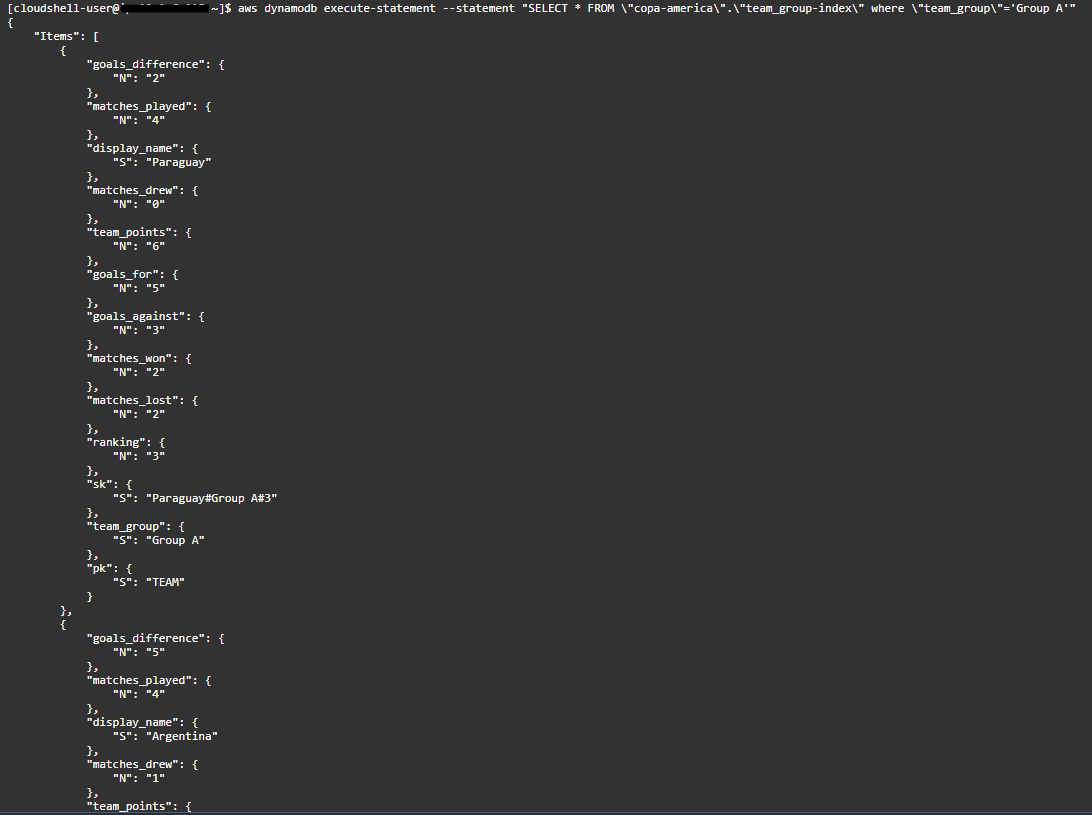
When querying DynamoDB, indexes play an important role to get the data with a specific view. This is also achieved with the SELECT statement from the "table-name"."index-name".
aws dynamodb execute-statement --statement "SELECT * FROM \"copa-america\".\"team_group-index\" where \"team_group\"='Group A'"
Updating values on DynamoDB
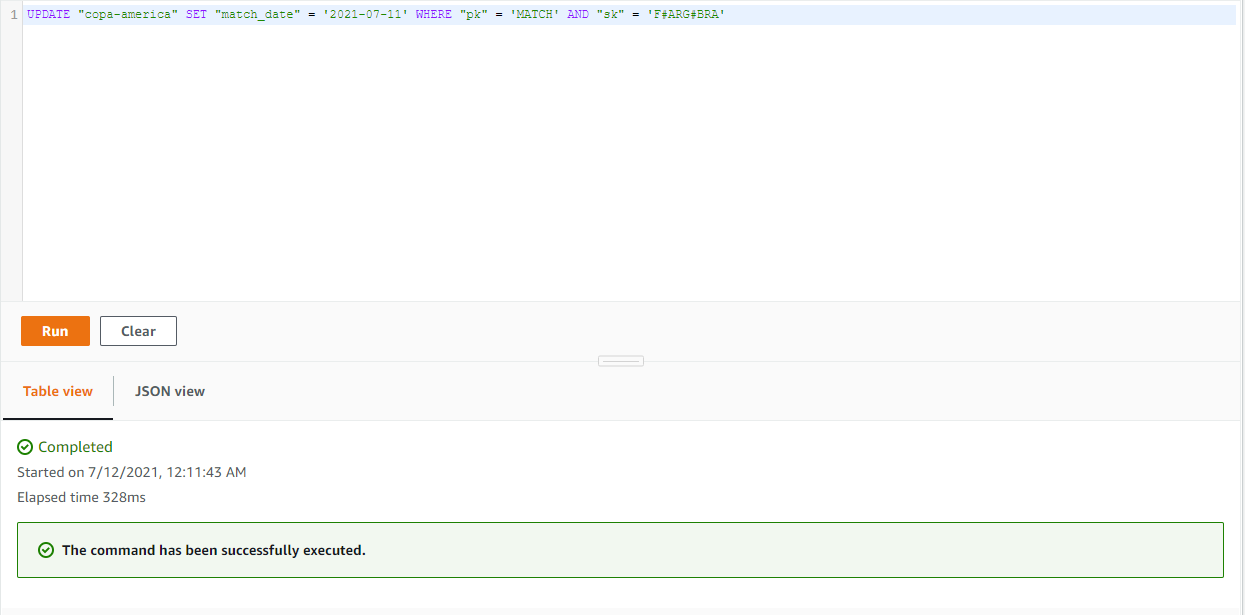
DynamoDB provisions updating of items with partition and sort key as defined in the table schema, the same is possible with the UPDATE-SET statement on PartiQL.
UPDATE "copa-america" SET "match_date" = '2021-07-11' WHERE "pk" = 'MATCH' AND "sk" = 'F#ARG#BRA'
Deleting records on DynamoDB
The delete operation on DynamoDB is performed with DROP statement on PartiQL.
DELETE FROM "copa-america" WHERE "pk" = 'TEAM' AND "sk" = 'Bolivia#Group A#5'
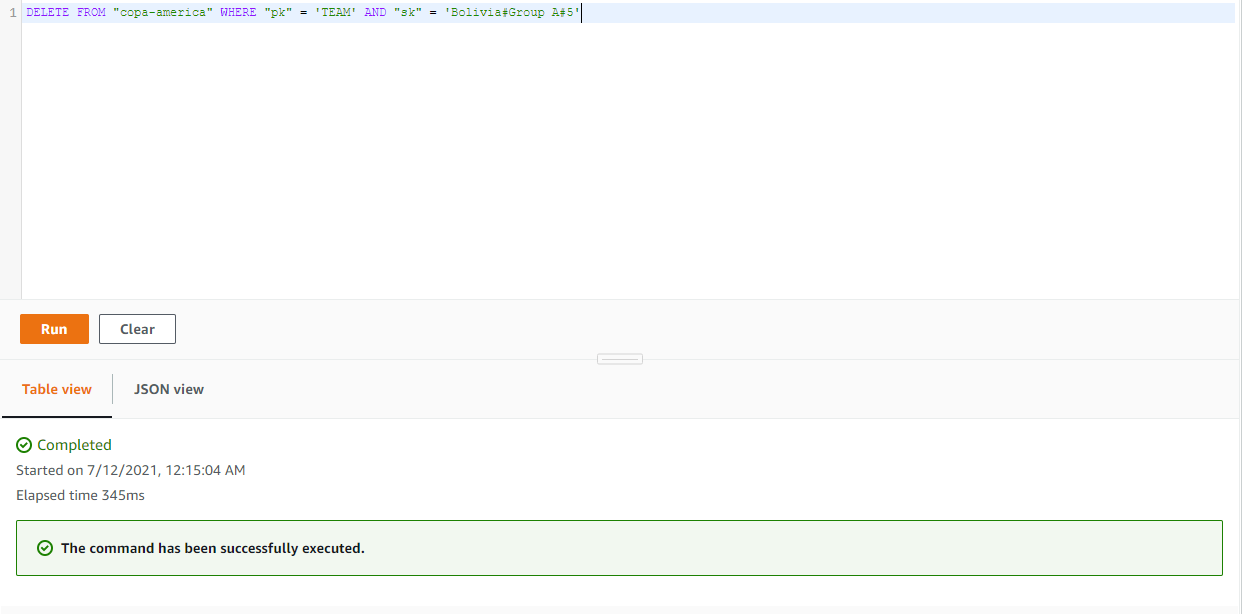
PartiQL Editor
The same operations are possible on web-console in the PartiQL Editor section.
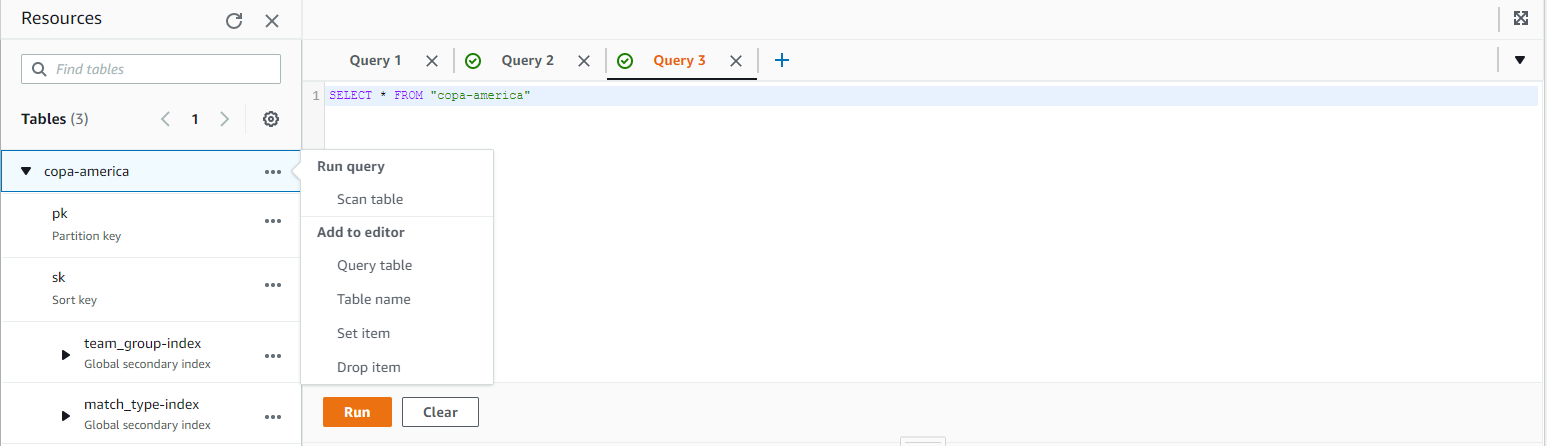 PartiQL Editor prompts you with the several options and on selection, it shows up the syntax of the PartiQL Statement making it easier and developer friendly.
Conclusion
DynamoDB with PartiQL makes it a lot more devloper friendly not only with the syntax snippets for all DynamoDB supported operations - PUT,SCAN,QUERY,UPDATE,DELETEwith SQL similar statements - INSERT,SELECT,UPDATE,DROPmaking it easier with a structured query. It also helps new devlopers with SQL background to get started quickly.